What is Phishing & How It’s Done: Complete Guide to Understanding Phishing Attacks
Phishing is one of the most widespread and dangerous cyberattacks in the digital world. It’s a type of social engineering attack where attackers deceive people into revealing sensitive information — such as passwords, login credentials, credit card numbers, or personal data — by impersonating legitimate organizations or trusted contacts.
The name “phishing” is a metaphor, similar to fishing with bait — attackers lure victims using fake messages, fake websites, or convincing communications to “catch” confidential information.
What Is Phishing?
Phishing is a fraudulent attempt to obtain sensitive information by posing as a trustworthy entity in electronic communication. It often involves spoofed emails, fake links, deceptive websites, or malicious messages that trick users into revealing credentials or installing malware.
It’s usually conducted through:
Emails that appear from legitimate sources
SMS messages asking for information
Social media or messaging app links
Voice calls pretending to be real support teams
QR codes or malicious attachments
The attacker’s goal is simple: steal information for financial gain, identity theft, or further cyberattacks.
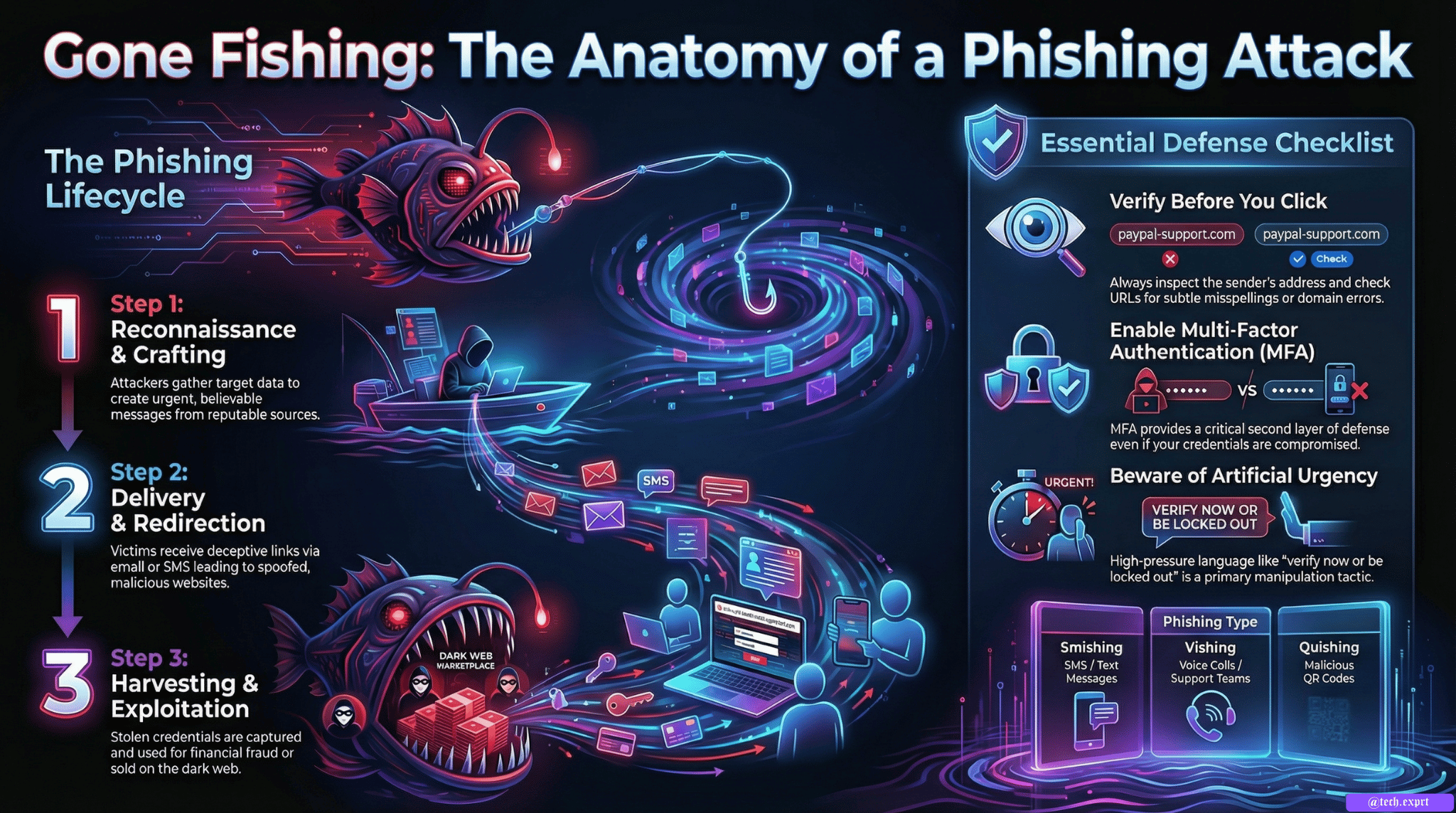
How Phishing Attacks Are Done — Step by Step
Phishing works by combining social engineering and technical deception to trick the victim:
Reconnaissance & Data Collection
Attackers often gather basic information about targets — email patterns, social media data, job titles — to craft believable messages.Crafting Deceptive Communications
Phishing messages are written to appear as if they come from reputable sources like banks, delivery services, employers, or tech platforms. These messages often include urgent language to push the victim to act without thinking — for example “verify your account now or it will be locked.”Email or Message Delivery
The phishing content is sent to a large list of potential victims (bulk phishing) or tailored to specific individuals (spear phishing).Fake Website or Redirect
The phishing message includes links that lead to a spoofed website — a site that looks legitimate but is controlled by the attacker. Attackers may use domain spoofing or fraudulent URLs to fool users.Credential Harvesting or Malware Installation
Once the victim enters their details on the fake page, the attacker captures them. In some cases, clicking a link also delivers malware that can monitor activity or take control of the device.Exploitation of Stolen Data
Captured credentials can be used to access accounts, commit financial fraud, sell data on dark web markets, or launch more attacks.
Common Phishing Techniques
Phishing can take many forms, depending on the attacker’s goal:
1) Deceptive (Mass) Phishing
Generic fake emails sent in bulk to trick users into clicking malicious links or forms.
2) Spear Phishing
Highly targeted phishing tailored to specific individuals or companies. Attackers often research their victims before sending.
3) Smishing
Phishing via SMS or text messages that urge the recipient to click links or reveal data.
4) Vishing (Voice Phishing)
Attackers call victims pretending to be bank officials, tech support, or government authorities to extract information.
5) Pharming
Redirects users to malicious websites even if the correct URL is typed, often using compromised DNS.
6) Angler Phishing
Using fake support accounts on social media to trick users into clicking malicious links.
7) QR Code Phishing (Quishing)
Malicious QR codes that direct users to harmful websites or fake portals when scanned.
Real-World Examples
Phishing isn’t just theoretical — it has real consequences:
Voice phishing (vishing) scams have tricked victims into paying large sums after impersonators faked emergency situations.
Advanced campaigns use AI-generated phishing content to bypass filters and sound convincing, demonstrating that attackers are adopting sophisticated tools.
Public QR code phishing (quishing) incidents have increased as attackers exploit mobile habits.
How to Protect Against Phishing
Understanding phishing is critical, but prevention is even more important. You can protect yourself by:
✔ Always verify the sender — don’t click links from unsolicited or unfamiliar emails.
✔ Check URLs carefully — look for misspellings or suspicious domain names.
✔ Be wary of urgent messages — attackers use fear or urgency as a manipulation tactic.
✔ Enable multifactor authentication (MFA) — this adds a second defense layer even if credentials are stolen.
✔ Keep software updated — up-to-date security patches help mitigate exploitation.
Conclusion
Phishing remains one of the most common cyber threats because it exploits human psychology and trust. By understanding how phishing works and recognizing common techniques, you can better protect your sensitive information and reduce the risk of falling victim to attacks. Staying informed and cautious is essential in today’s increasingly digital world.